Housing, Travel
& Activities
Automate and Supercharge Workflow
 Personalize Experiences
Housing Management
Lenos Studio delivers the most advanced Housing Block Management capabilities in the industry.  Whether you’re managing one hotel or a city‑wide, Lenos setup is fast and intuitive. Every housing detail is updated in real time and automatically synchronized with your companion EventSync app, ensuring planners, attendees, and on‑site teams are always up-to-date. Lenos delivers enterprise‑grade power without complexity.
Multistay
A single registration record can have multiple housing reservations, at the same hotel or different venues.
 
Housing reservations are automatically displayed on the proper housing reports for each venue.
Pay-on-own
Designate what days are Pay On Own and not Master Billed for a registrant.
 
Pay-On-Own days are automatically designated on the Master Rooming list for the hotel to manage.
 
Housing reports automatically calculate Master Billed and Pay on Own payments for reconciliation.
Master Rooming Lists & Change reports
Master Rooming Lists are created for each hotel/venue automatically.
 
Rooming Lists can be run in different formats, Primary and Guest and Roommates, etc.
 
Change Reports identify all data that has been changed, added or deleted in a registrant record.
 
Change reports are archived for future reference.
 
Master Rooming Lists and Change Reports can be assigned to a hotel representative.
Gaps in Stay
Any mismatches in assigned Arrival and Departure Dates, are automatically identified for management.
Automated paired activity
when the primary registers, it allocates a reserved slot for their guest
Everything Confirmation
Hotel data for primary and their guest(s) is automatically integrated into a single web and e-mail confirmation.
Inventory Controls
Inventory controls includes Standard and hidden Admin block(s)
Policy and Rules-based
Customizable to accommodate complex booking policies/rules and procedures for individuals, international and domestic groups
Mobile
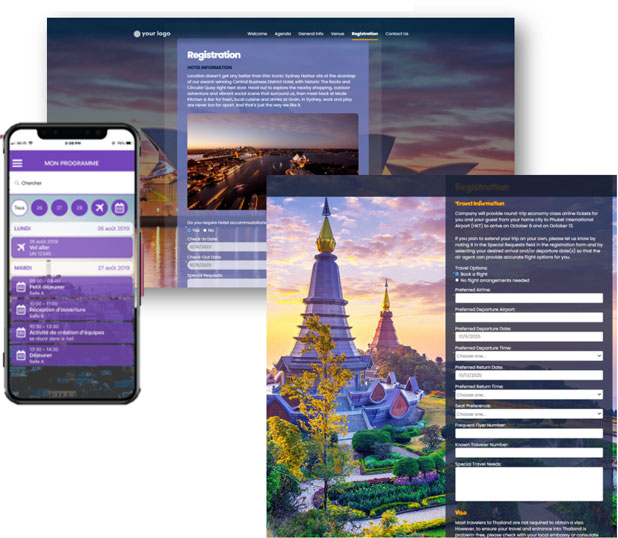
Housing data is displayed in the Lenos Event Sync mobile application for the registrant.
Upload, Prepop
Integrated Email Marketing
Set automated email messaging based on registrant statuses - ex: non response, resend same or new email with special offers.
List some of the key reporting
Travel Management
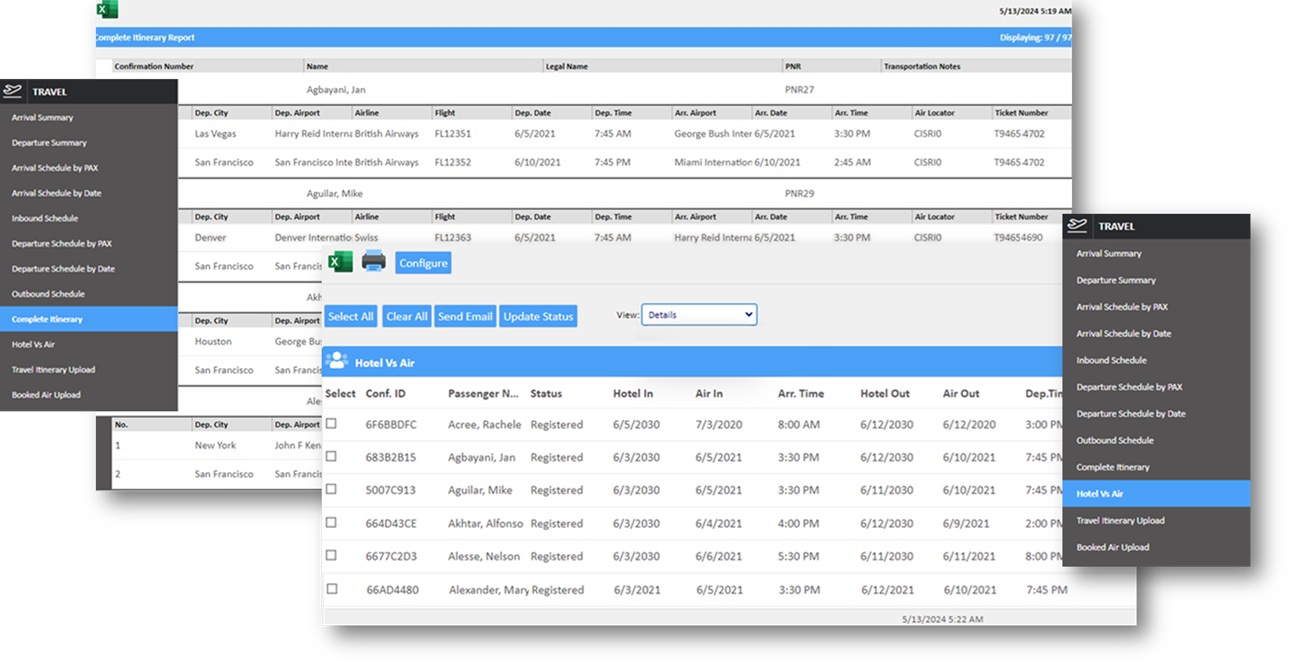
Single source of truth and reporting for air travel, whether travel is booked through Sabre/Concur, bulk uploaded or entered by the registrant.
Single Source of Air Data
Regardless of the source of air data, it is aggregated into a single report.
 
All data is updated in real-time as it is entered/received.
 
The source of air data is identified to ensure that it is properly QC’ed and reviewed.
Change Report
All air changes are identified by a user defined date range and denoted.
 
Change reports are archived for reference.
Hotel vs. Air
Automated identification of records (in real-time) when there is no hotel or air data or dates for air and hotel are mismatched.
Hotel & Air Report
Air reports automatically identify early arrivals and late departures and their assigned hotel for proper management.
Comprehensive Air Data
Sabre/Concur data will include all legs in the itinerary.
 
Any bulk uploaded data will include all legs in the itinerary.
Primary/Guest Air Data
Primary and Guest data are consolidated into a single web page confirmation and email.
 
Activity Management
  • Allocate and manage live activity inventory by registration type
     
  • Reserved inventory for assignment to VIPs  
  • Automated paired activity selections for primary and guest - when the primary registers, it allocates a reserved slot for their guest
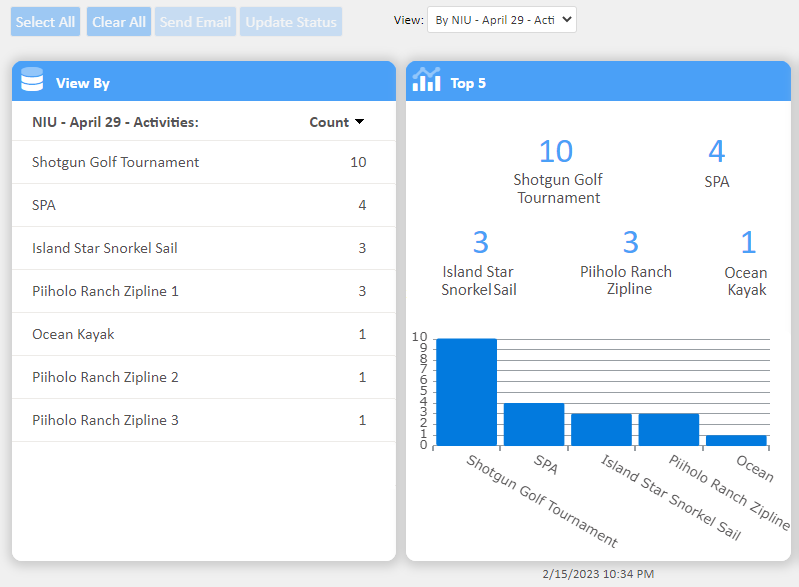
  • Aggregate and individual activity reporting
     
Four Tiered Triggers
Tiered triggers provide you accurate data for the activity (e.g. Do you want to play golf, do you need clubs, are you left/right handed, do you need shoes, what is your size).
 
Answers to trigger questions can further trigger questions up to four tiers to ensure even deeper responses.
 
Responses to trigger questions are automatically sequentially laid out in AdHoc Reports.
Post registration add-on charges
Allow registrants to add purchases not made initially in registration.
 
Manual transaction fee adjustments to registrant records can be directly paid by registrants.
 
Pay for specific guest fees by guest type and guest.
 
Multiple transactions are authorized to the extent that an item can be purchased.
 
Tokenization allows payment by credit card used by the primary registrant or entry of a new credit card.
Bulk Upload Activities
Easily create activities by uploading them, including inventory, descriptions and notes.
 
Just as easily update all or some of your activities.
Inventory Control & Hidden Inventory
Easily manage the inventory across all registrants or by registrant type.
 
Know what total inventory numbers are and what has been allocated.
 
Designate inventory to administratively allocate to ensure that VIPs and others are accommodated.
Automated paired activity
Paired activities (two slots) selected by a primary registrant is automatically selected for a guest, regardless of when the guest registers.
 
If the primary changes to a single activity, any paired activity will be removed and another activity can be selected for the guest.
Empowering organizations of all sizes, from independents and small agencies to the world’s largest companies.